
The Posts page allows you to create, manage, and organize written content such as devotionals, articles, or updates. From here, you can view, search, and edit posts, attach files, tag topics, and publish posts to your feeds or homepage.
Access Posts
- From the left-side menu, click Content > Posts.
- On the Posts page, you can:
- View all existing posts.
- Search for a specific post.
- Add a new post.
- Edit or delete existing posts.

Post List Details
Each post listed includes:
- Title – The title of the post.
- Author – The person who created or published the post.
- Date – The publish date of the post.
- Actions – Options to Edit or Delete the post.

View Post Details
Click on a post Title to open and view its details. Each post record includes:
- Title and Publish Date.
- Author and Email Address.
- Written Post – The full text or article content.
- Audio Transcript – If available, click Listen to play the AI-generated or uploaded audio version.
- Tags – View or edit tags associated with the post.
- Attachments – View attached files or click Add Attachment to upload new files.
- Add a Description for each attachment for context.
- Actions – Edit or Delete the post.

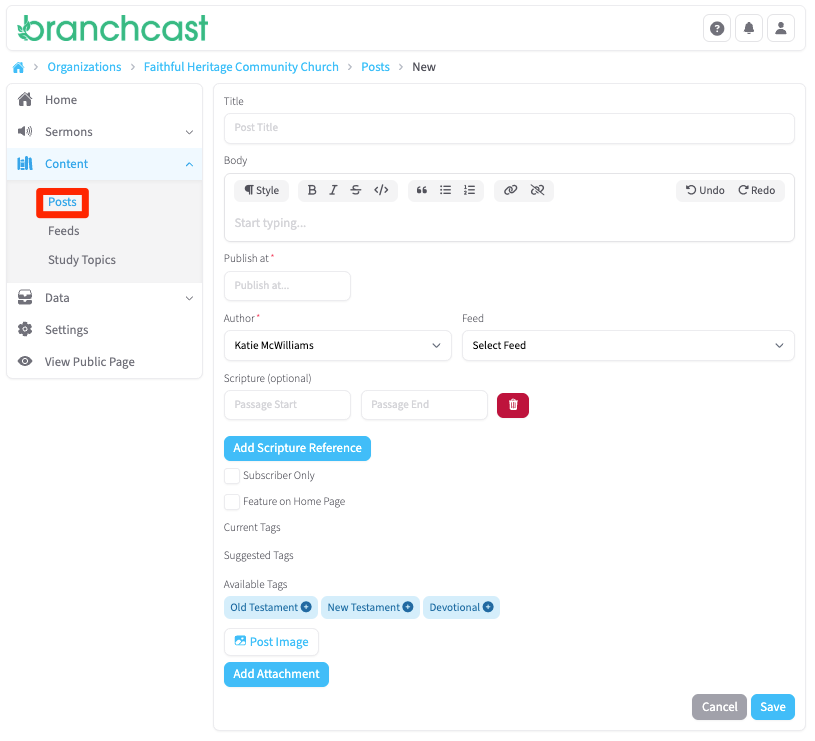
Add a New Post
- Click + New Post.
- Enter the Post Title.
- In the Body field, type or paste your written content.
- Select a Publish At date.
- Choose the Author from the dropdown list.
- Authors can be created from Content > Authors.
- Select the Feed where the post should appear.
- Add Scripture References:
- Click Passage Start and choose the book, chapter, and verse.
- To select Philippians 4:8, click Philippians → 4 → 8.
- Click Add Scripture Reference to include additional passages.
- (Optional) Check Subscriber Only to make the post visible only to subscribers.
- (Optional) Check Feature on Home Page to display the post on your homepage.
- Tags – Review and select from the following:
- Current Tags – Tags already applied to the post.
- Suggested Tags – Based on post content.
- Available Tags – General tags you can apply manually.
- Click Post Image to upload a representative image (JPG or PNG format).
- Click Add Attachment to include related files or resources.
- Click Save when finished.
Tips
- Posts are an excellent way to share devotionals, reflections, or updates outside of sermon content.
- Tag posts to make them more discoverable in search and grouped topics.
- For consistent appearance, use high-quality square images (JPG or PNG).
- Use the Subscriber Only feature for exclusive member content or early access.