
The Podcasts page allows you to create, manage, and view all podcasts associated with your organization. From here, you can add new podcasts, search for existing ones, edit or delete podcasts, and view detailed information about each podcast’s series, author, and configuration.
Access Podcasts
- From the left-side menu, click Podcasts.
- On the Podcasts page, you can:
- View all existing podcasts.
- Search for a specific podcast.
- Add a new podcast.
- Edit or delete existing podcasts.

Podcast List Details
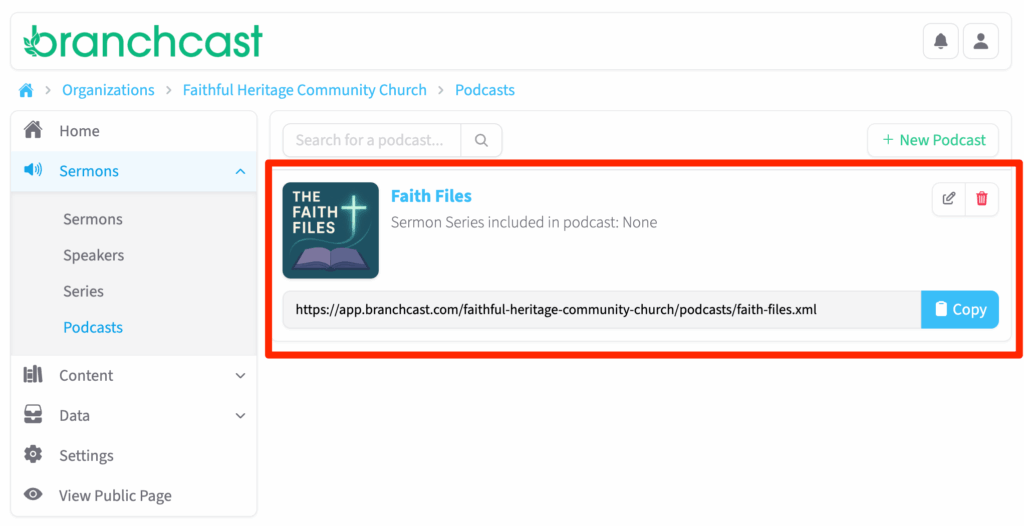
Each podcast listed includes:
- Title – The name of the podcast.
- Image – The image used for the podcast.
- Series – The sermon series included in the podcast.
- Link – The URL link to the podcast feed.
- Actions – Options to Edit or Delete the podcast.
View Podcast Details
Click on a podcast Title to view its details, including:
- Associated Series (all included series will be listed).
- Author name.
- Whether it’s the Default Podcast.
- Category assigned.
- Owner Name and Contact Email.
- The Podcast Feed Link (for use on Apple Podcasts, Spotify, etc.).
To make changes, click Edit next to the podcast title. To remove it, click Delete.

Add a New Podcast
- Click + New Podcast.
- Enter the Podcast Title.
- In the Description box, provide a summary of the podcast.
- Enter the Author name.
- Choose the Language from the dropdown list.
- Check Default Podcast if you want all sermons to be automatically included in this podcast.
- From the dropdowns, select one or more Series to include.
- Choose a Category from the available list.
- Enter the Owner Name and Contact Email. These fields are required by Apple Podcasts and are used for administrative contact only. They are not displayed publicly.
- Click Podcast Image to upload a square image (JPG or PNG) at least 1400×1400 pixels.
- Click Save to create your podcast.

Tips
- Only one podcast can be marked as the Default Podcast.
- Ensure your podcast image meets Apple and Spotify size and format requirements (minimum 1400x1400px, square).
- Categories help improve visibility on podcast platforms—choose one that best fits your content.
- If you plan to distribute through Apple Podcasts, make sure your Owner Name and Contact Email are accurate and monitored.